MySQL 8.0 Database Admin Professional
2. Installing and Upgrading MySQL
2.1 Installing and Upgrading MySQL
Installing MySQL form Downloaded Packages RPM: red hat package manager: rpm -ivh packagename.rpm APT: advanced packaging tools: dpkg -i packagename.deb Required packages: Server, common, client Optional packages: Devel, embedded-compat, libs, libs-compat, test, router Installating on DEB: sudo dpkg -i mysql-{common, community-client, client, community-server, server}_*deb Starting service for first time on RPM: service mysqld start or systemctl Installing using package manager RPM: yum install mysql-community-server yum install mysql-workbench APT: apt-get install mysql-community-server apt-get install mysql-workbench Adding yum repository yum localinstall mysql180-community-release-e17-3.noarch.rpm Adding apt repository dpkg -i mysql-apt-config_0.8.12-1-all.deb Quiz - Which method must you create data directory manually? 1. Binary Archive installation for Linux (installation from source code) - Yes 2. DEB installation for Linux - Automatic 3. MySQL installer for Windows - Automatic 4. RPM installation for Linux - Automatic Linux /var/lib/MySQL: /usr/sbin: mysqld server /usr/bin: MySQL and other client programs and scripts /var/lib/mysql-files /etc: my.cnf configuration /var/log/MySQL: mysqld.log erorr log /usr/lib/systemd/system: mysqld.service single instance systemd startup script, mysqld@.service multi-instance systemd startup script /var/lib/mysql-keyring MySQLd: server process, can be launched manually to debug server $ mysqld --user=MySQL --datadir=/var/lib/MySQL --socket=/tmp/MySQL.sock Installation programs: mysql_secure_installation: security program that enables initial secure configuration mysql_tzinfo_to_sql: create sql script containing host's time zone information mysql_upgrade: automatically verifies database contents and verify compatibility with current SQL version Utility programs: mysql_config_editor: Manages login paths to simplify connection from command-line clients to MySQL server store user, password, host options in option file .Mylogin.cnf # MySQL --login-path=admin or # MySQL -L=admin mysqlbinlog: reads and replays contents of binary log (used for system recovery) mysqldumpslow: reads and summarizes contents of slow query log (see loading time) MySQL_ssl_rsa_setup: creates TLS keys and certificates ibd2sdi: extracts serialized dictionary information (SDI) from InnoDB tablespace files Command-line client programs: MySQL mysqladmin mysqldump mysqlimport mysqlslap: emulation mysqlshow mysqlcheck mysqlsh MAC: mandatory access control change password: # MySQL --user=root --password Quiz - Which is valid to change password? 1. specify a new password in /etc/my.cnf (Linux) or my.ini(Windows) - not perferable, needs to be hard coded 2. Issue a mysqladmin ... password command at the command line - Yes 3. launch MySQL with MySQL --initialize command - No 4. log into MySQL with ALTER USER - Yes Quiz 2: mysql_config_editor: 1. enables users to store authentication credentials in the .mylogin.cnf file 2. manages login paths to connect command-line clients to MySQL server Skill Check: # systemctl enable MySQL.service: makes mysqld start automatically at reboot # lm -s/opt/mysql* /usr/local/MySQL: create symbolic link to extracted directory of SQL RPM installation process: 1. registers system startup scripts for MySQL services 2. sets up MySQL user and group in OS mysqladmin -uroot -p -shutdown: stop MySQL server mysqladmin --login-path=admin shutdown: stop MySQL server using admin login path mysqladmin -uroot -p flush-hosts: flushes all infomraiton in host cache mysqladmin -uroot -p stop-slave: stop replication slave process pid-file=/var/run/MySQLd/MySQL.pid: specifies locaton of PID file export PATH=$PATH:/usr/local/MySQL/bin: add to ~/.bashrc to include /usr/local/MySQL/bin in executable search path ExecStart=/usr/local/MySQL/bin -- defaultsfile = etc/my.cnf --daemonize:3. Understanding MySQL Architecture
3.1 Understanding MySQL Architecture
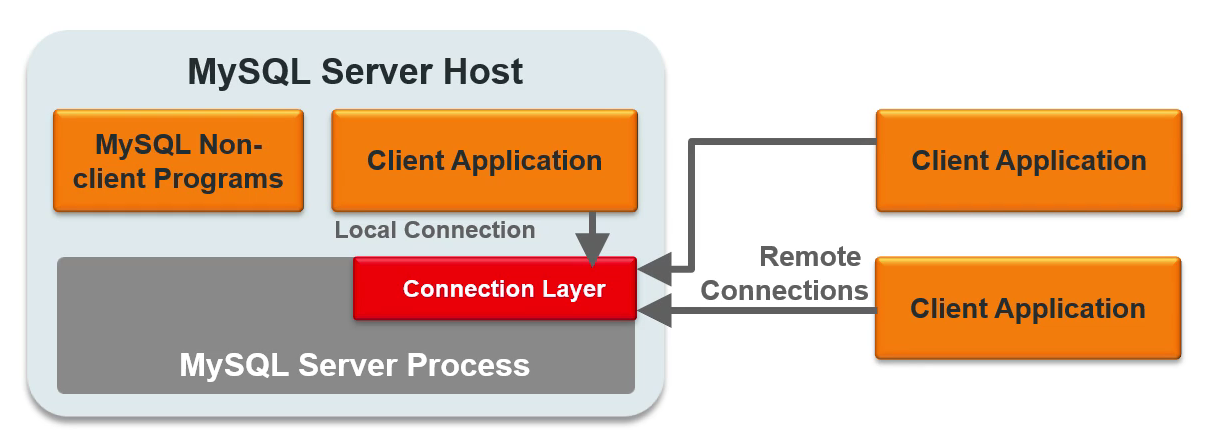
Figure 1: Architecture
Module 1.8 N3C: Characteristics
Terminology
- Host: physical machine or virtual machine including hardware configuration, OS, and network address.
- MySQL Server Software: mysqld, server number and features
- MySQL server instance: a mysqld server process that manages data directory (multiple instances can run on single host)
mysql --host=mysqlhost1 --user=root --password
mysql -h 192.168.1.8 -P 3309 -uroot -p
mysql -S /var/lib/mysql/mysql.sock -uroot -p
mysql -uroot -p
mysql -h localhost --protocol=tcp -uroot -p
mysql -h 127.0.0.1 -uroot -p
            mysql -h ::1 -uroot -p
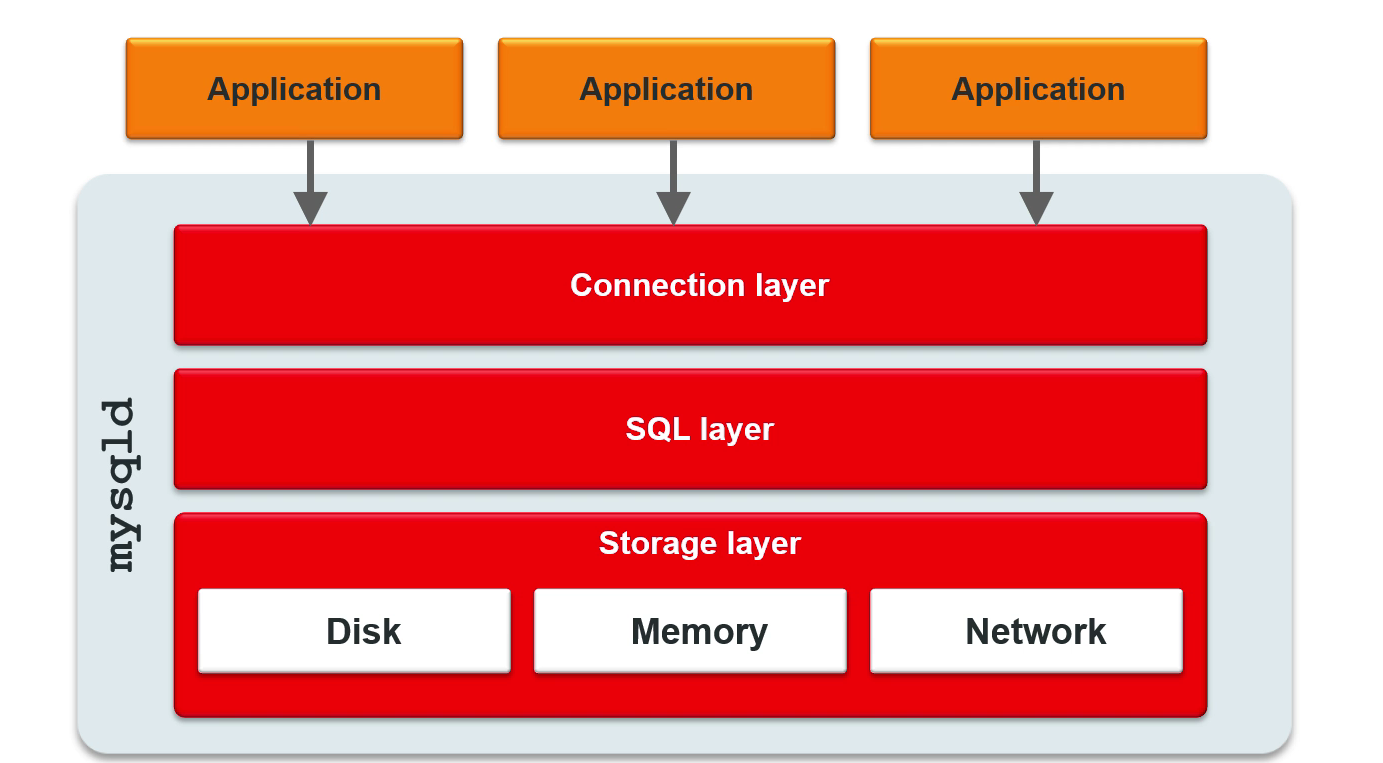
Figure 2: Connection Layer
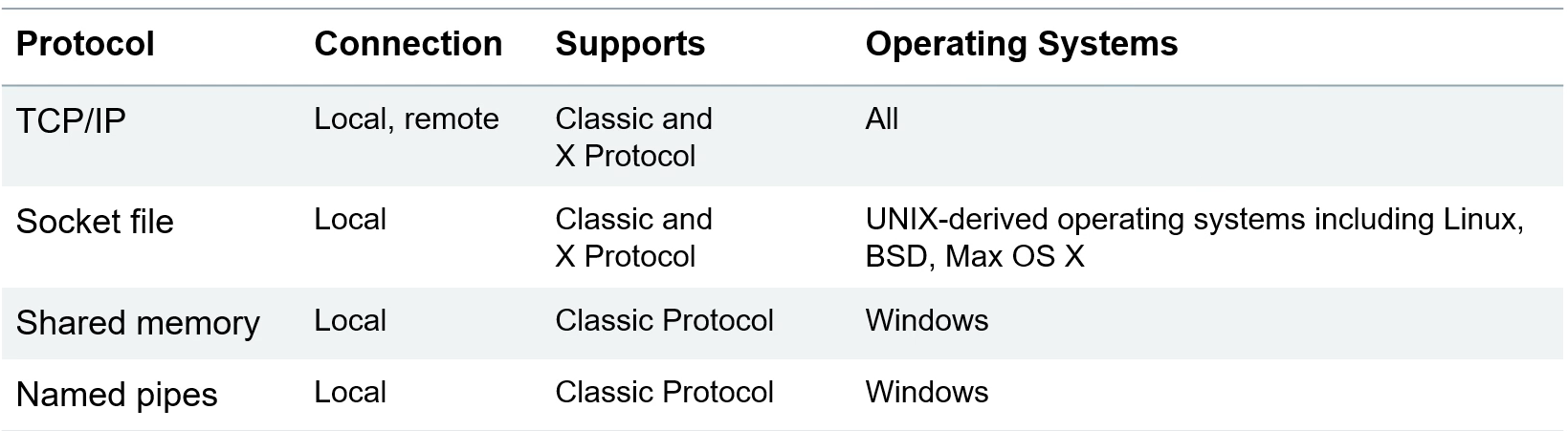
Figure 3: Connection Protocols